Purpose of the "Destination" selector
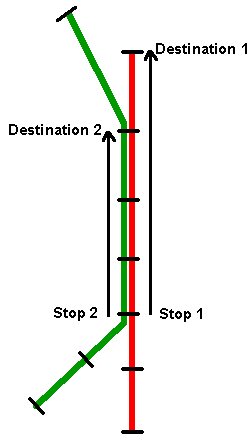
The "Destination" selector is useful in certain situations for determining predictions when there are multiple routes that serve your stops or if your route has multiple destinations. By selecting the "To Stop" in these situations you will get all the predictions that are of use to you and you won't get predictions for vehicles that are not going to your destination.The drawing below shows an example using two routes: the Red Route and the Green Route. The drawing also shows two examples: Starting at "Stop 1" and going to the destination "Destination 1"; and starting at "Stop 2" and going to the destination "Destination 2". For the first case one can only take the Red Line because it is the only one to go to "Destination 1". Therefore predictions can only be provided for the Red Line. For the second case though one can get to the desired "Destination 2" using either the Red or the Green Route. Therefore by specifying the Destination, the appropriate predictions can be presented. This feature is also useful for when a route has multiple destinations. Also, it means that predictions will only be given for vehicles that are actually going all of the way to your destination.
If the stop where you are boarding is only served by a single route with a single destination, the "Destination" selector will not be displayed because it will not make a difference when obtaining predictions.
The default "Destination" is the last stop for the shortest trip pattern for your route. What this means in laymans terms is that the default "Destination" stop will cause you to see predictions for all vehicles serving that stop, even if the buses are not going to the end of the route. If you only want to see predictions for vehicles that go beyond the default stop then you will need to select the appropriate Destination stop.